
Data Storage
USB extension cable

Flash Drive

A Teacher’s Guide to Using a Flash Drive
What is computer data?
Think of "data" as any digital item you create or use. This includes your lesson plans (Word docs), classroom photos, student videos, or even those PDF worksheets you download. Just like paper handouts, these digital files can be neatly organized inside folders on your computer.
Where is data stored?
While your computer has its own internal storage (the hard drive), you can also save your work onto portable gadgets called memory devices. You might know these by many names: memory sticks, thumb drives, pen drives, or simply USB drives.
Why use a USB Flash Drive?
I recommend the flash drive because it is the easiest and most portable way to carry your work between school and home.
My Daily Routin
What is computer data?
Think of "data" as any digital item you create or use. This includes your lesson plans (Word docs), classroom photos, student videos, or even those PDF worksheets you download. Just like paper handouts, these digital files can be neatly organized inside folders on your computer.
Where is data stored?
While your computer has its own internal storage (the hard drive), you can also save your work onto portable gadgets called memory devices. You might know these by many names: memory sticks, thumb drives, pen drives, or simply USB drives.
Why use a USB Flash Drive?
I recommend the flash drive because it is the easiest and most portable way to carry your work between school and home.
My Daily Routin
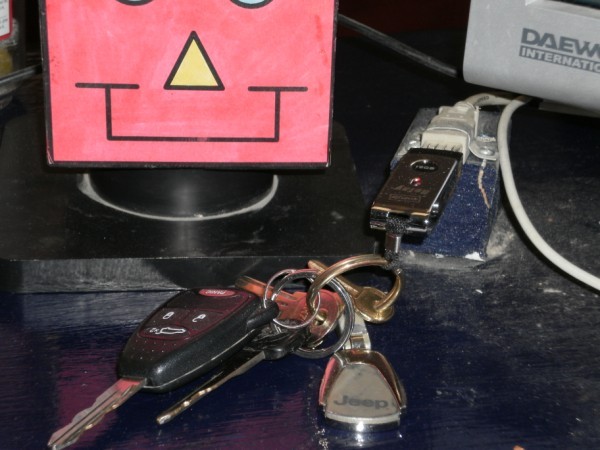
To make things simple, I kept my flash drive attached to my keychain. Since I couldn't leave for the day without my car keys, I never accidentally left my files at school!
Easy Access
I plugged a USB extension cable into my desk computer and secured the end of it to my desktop. This way, I didn't have to crawl under the desk to plug in my drive; I just snap it into the cable on top of my desk.
Automatic Updates (Syncing)
I set my drive to "synchronize" with my computers. This sounds fancy, but it just means that as soon as I plug it in, the computer automatically copies any new files I worked on at home onto the school computer (and vice-versa).
Built-in Backup
Because my files were on both my computers and my flash drive, I always had a spare copy if something went wrong and believe me; things went wrong.
Setting up this system took a few minutes at the start of the day, but it made digital life much more organized and stress-free!
Tip: Make sure you close your drive properly at the end of the day. If the computer says it "cannot eject" the drive, it usually means you still have a document or a photo open from that drive. Just close your programs and try again!
Easy Access
I plugged a USB extension cable into my desk computer and secured the end of it to my desktop. This way, I didn't have to crawl under the desk to plug in my drive; I just snap it into the cable on top of my desk.
Automatic Updates (Syncing)
I set my drive to "synchronize" with my computers. This sounds fancy, but it just means that as soon as I plug it in, the computer automatically copies any new files I worked on at home onto the school computer (and vice-versa).
Built-in Backup
Because my files were on both my computers and my flash drive, I always had a spare copy if something went wrong and believe me; things went wrong.
Setting up this system took a few minutes at the start of the day, but it made digital life much more organized and stress-free!
Tip: Make sure you close your drive properly at the end of the day. If the computer says it "cannot eject" the drive, it usually means you still have a document or a photo open from that drive. Just close your programs and try again!